The Most Common Windows Malware Families in 2026
Windows remains the most targeted operating system for cybercriminals in 2026, with new malware variants emerging daily. Understanding common Windows malware threats and how to protect yourself is essential for every home user. This guide breaks down the most prevalent malware families targeting Windows systems and provides practical steps for protection.
What Makes Windows a Prime Target for Malware?
Windows dominates the desktop market with billions of users worldwide, making it an attractive target for cybercriminals. Attackers exploit both user behavior and system vulnerabilities to distribute malicious software. With over 560,000 new malware samples detected daily in 2024, the threat online continues to evolve rapidly.
Modern Windows malware has become increasingly sophisticated. Rather than simple viruses, today’s threats are often hybrid attacks that combine multiple techniques. Trojans deliver payloads, infostealers harvest credentials, and ransomware encrypts files for profit. Malware developers now use cross-platform languages like Rust and Go, expanding their reach across Windows, macOS, and Linux systems simultaneously.
The Most Dangerous Windows Malware Types
Trojans: The Most Common Threat
Trojans represent approximately 58% of all malware attacks, making them the most prevalent threat to Windows users. These programs disguise themselves as legitimate software, free game downloads, cracked applications, or urgent security updates, tricking users into installing them voluntarily.
Once executed, trojans can perform numerous malicious actions, including stealing personal information, logging keystrokes, creating backdoors for remote access, or downloading additional malware. Banking trojans specifically target financial data by intercepting login credentials and monitoring online banking sessions. Popular Trojan families include Remote Access Trojans (RATs) that give attackers complete desktop control, downloader trojans that fetch secondary malware, and clipper trojans that steal cryptocurrency by replacing wallet addresses.
Modern social engineering techniques make Trojans particularly dangerous. Attackers use fake error messages and deceptive pop-ups to convince users to run malicious commands. The ClickFix campaign demonstrates this evolution; fake Windows Blue Screen of Death screens appear in browsers, instructing users to paste and execute malicious PowerShell commands that install trojans like DCRAT.
Ransomware: The Most Financially Devastating
Ransomware encrypts your files and demands payment for decryption keys. This malware family caused over $30 billion in damages globally in 2023, with attacks targeting 59% of organizations. However, home users remain vulnerable to phishing emails and exploit kits.
Common ransomware strains include WannaCry, LockBit, and Clop. Modern ransomware operations practice “multifaceted extortion”, attackers first steal sensitive data, then encrypt files, threatening to leak information publicly if ransom demands aren’t met. Recovery without backups is often impossible, even after payment.
Infostealers: Silent Data Thieves
Infostealers account for 69% of detected Windows threats according to security monitoring. These programs quietly collect sensitive information, including passwords, browser history, cryptocurrency wallets, and authentication cookies. Popular infostealer families like Lumma and Vidar operate as Malware-as-a-Service, available for rent on underground markets.
Infostealers typically run silently in the background, avoiding obvious symptoms. Stolen credentials are sold on dark web marketplaces or used for identity theft, financial fraud, and account takeovers. The average data breach cost organizations $4.45 million in 2023, but individual victims face bank account drains, credit damage, and identity theft.
Worms: Self-Replicating Network Threats
Worms spread automatically across networks by exploiting system vulnerabilities, requiring no human interaction. They scan for vulnerable devices, replicate themselves, and move from computer to computer. While primarily spreading behavior focuses on propagation, many worms carry dangerous payloads.
The infamous WannaCry worm exploited the EternalBlue vulnerability in Windows systems, combining worm behavior with ransomware encryption. Worms consume network bandwidth, slow systems, and can disable security features while spreading to every connected device.
Spyware and Keyloggers: Privacy Invasion
Spyware covertly monitors user activity, collecting browsing habits, passwords, personal communications, and even audio/video through webcams and microphones. Keyloggers specifically record every keystroke, capturing passwords, credit card numbers, and private messages before sending data to attackers.
These programs often arrive bundled with free software downloads or through Trojan delivery mechanisms. Victims rarely notice an infection until experiencing unauthorized account access or financial theft.
Rootkits: Hidden System Manipulators
Rootkits hide deep within Windows systems, concealing malicious processes from standard antivirus detection. They modify system files and registry entries, allowing attackers to maintain persistent access while evading security tools. Rootkits often accompany other malware, protecting Trojan or backdoor installations.
Detection requires specialized security tools capable of examining system memory and boot sectors. Once installed, rootkits are extremely difficult to remove without system reinstallation.
Recent Malware Campaign Examples
Several sophisticated campaigns emerged in late 2025 and early 2026:
ErrTraffic uses fake browser error messages with conversion rates approaching 60%. When users follow instructions to “fix” fake problems, they unknowingly execute commands that install infostealers like Lumma or Vidar. The attack works across Windows, Android, macOS, and Linux through simple JavaScript injection.
Remcos RAT campaigns employ multi-stage loaders using legitimate Windows processes like MSBuild.exe to execute remote access trojans. The modular framework includes self-healing mechanisms that re-download corrupted payloads, making detection and disruption extremely difficult.
Banking trojan resurgence on Android demonstrates cross-platform threats, but Windows users face similar dangers. Advanced banking trojans like DanaBot and TrickBot continue targeting financial institutions through malicious email attachments and fake software updates.
How to Protect Your Windows Computer
Keep Windows Updated
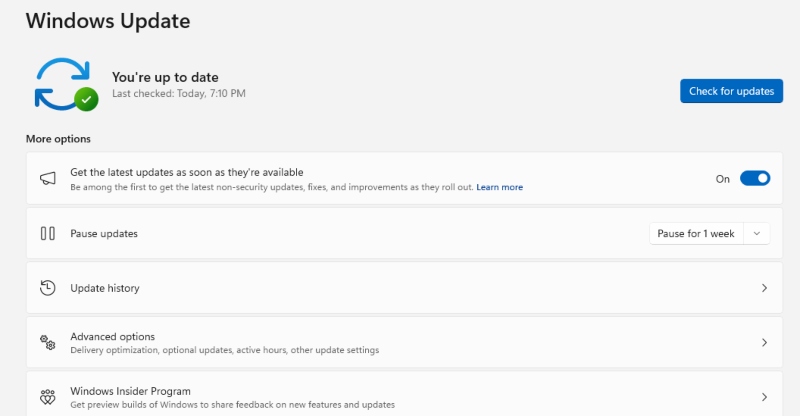
Microsoft releases security updates every month addressing newly discovered vulnerabilities. Attackers actively exploit known flaws, making timely updates your first defense line.
How to Update Windows 10:
- Click the Start button
- Select Settings (gear icon)
- Choose “Update & Security”
- Click “Windows Update” in the left panel
- Click “Check for updates”
- Install any available updates and restart when prompted
How to Update Windows 11:
- Click the Start button
- Select Settings
- Click “Windows Update” in the left panel
- Click “Check for updates”
- Download and install available updates
- Restart your computer when prompted
Enable automatic updates to ensure critical security patches install without delay. Microsoft’s January 2026 Patch Tuesday addressed 114 vulnerabilities, including actively exploited zero-day flaws, demonstrating why regular updates matter.
Use Reliable Antivirus Software
Windows Defender provides baseline protection for most users, but additional security software offers enhanced detection and real-time threat monitoring. Choose reputable antivirus solutions that update definitions automatically and include behavior-based detection for identifying new malware variants.
Practice Safe Browsing Habits
Most malware infections start with user action. Avoid downloading software from unofficial websites or torrents. Never execute commands from random websites or pop-up messages. Be skeptical of urgent security warnings, unexpected prize notifications, and free software offers that seem too good to be true.
Verify website legitimacy before entering credentials. Check for HTTPS encryption and correct domain names; attackers create convincing fake banking and shopping sites to harvest login information.
Be Cautious with Email Attachments
Approximately 92% of malware spreads through email. Never open attachments from unknown senders. Be suspicious of unexpected attachments even from known contacts; their accounts may be compromised. Common malicious attachment types include .exe, .zip, .scr, and macro-enabled Office documents.
Phishing campaigns use fake invoices, shipping notifications, and urgent security alerts to trick recipients. Hover over links to preview destinations before clicking, and manually navigate to websites rather than using email links for sensitive transactions.
Create Regular Backups
Ransomware can destroy years of personal files, photos, and documents. Maintain backup copies on external drives or cloud storage. Follow the 3-2-1 backup rule: three copies of data, two different storage types, one offsite location.
Disconnect external backup drives after completing backups to prevent ransomware from encrypting them alongside primary files.
Enable Windows Security Features
Windows includes built-in protection features that many users never activate. Turn on ransomware protection, controlled folder access, and Windows Firewall. Use Microsoft Defender SmartScreen to block known malicious websites and downloads.
For business or sensitive home use, enable BitLocker drive encryption to protect data if devices are lost or stolen.
Restrict User Account Privileges
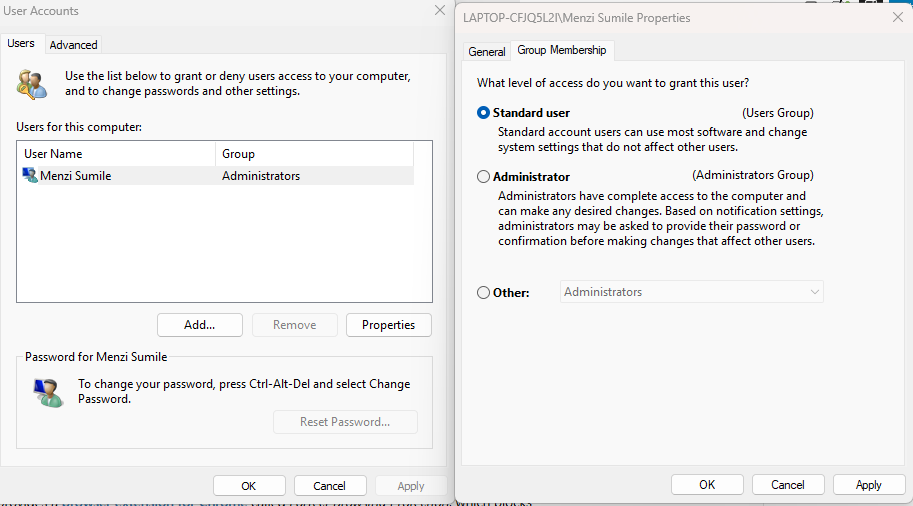
Avoid using administrator accounts for daily activities. Standard user accounts limit malware’s ability to make system-level changes. Create separate accounts for different family members rather than sharing one administrator account.
How to Create a Standard User Account in Windows 10/11:
- Open Settings
- Click “Accounts”
- Select “Family & other users”
- Click “Add someone else to this PC”
- Follow prompts to create the account
- Select the new account and click “Change account type”
- Set as “Standard User” instead of Administrator
Monitor System Behavior
Watch for warning signs of infection: unexpected slowdowns, frequent crashes, unknown programs running at startup, excessive network activity when idle, disabled security software, or unauthorized account access. Investigate unusual behavior promptly rather than ignoring symptoms.
Strengthen Your PC Security with Fortect
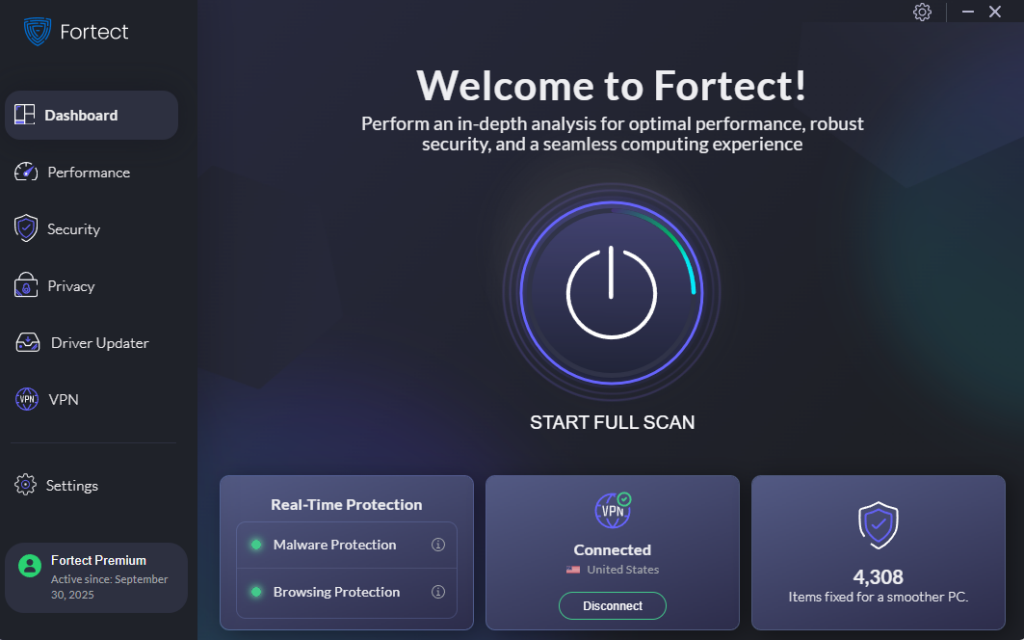
Fortect delivers advanced real-time malware protection specifically designed for Windows users facing today’s threats. It automatically scans your PC for both traditional and emerging dangers, including common Windows malware like trojans, infostealers, and ransomware, eliminates them safely, and restores damaged system files for improved performance. Its smart threat-detection engine continuously monitors suspicious activity and alerts you before harmful actions can take place, helping keep your device secure and running efficiently.
With the growing sophistication of malware families in 2026, having comprehensive protection that combines detection, removal, and system repair ensures your Windows computer stays protected against the evolving threat online.
Fortect Premium now comes with a built-in VPN featuring Auto-Protect on public Wi-Fi, keeping your connection secure even on open networks. It encrypts your internet traffic to protect your privacy and helps block hackers who target unsecured connections, a frequent gateway for zero-day attacks and other network-based threats.
Download and install Fortect now.
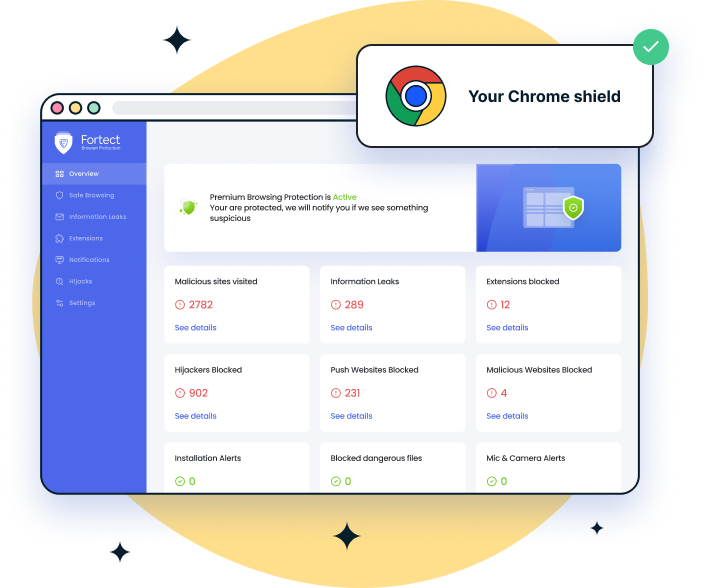
For Chrome users, the Fortect Browsing Protection extension adds an extra layer of security by blocking dangerous websites before they load, warning you about suspicious pages to help prevent scams, and removing harmful extensions that could put your data at risk.
Understanding Malware Evolution in 2026
The malware landscape continues evolving with several concerning trends. Malware-as-a-Service platforms democratize cybercrime, allowing technically inexperienced criminals to launch sophisticated attacks. Cross-platform development enables attackers to target multiple operating systems with a single codebase.
Social engineering remains the primary infection vector. Fake error messages, urgent security warnings, and deceptive popups exploit human psychology more effectively than traditional malware downloads. These tactics bypass traditional security measures by convincing users to manually execute malicious commands.
AI-assisted development accelerates malware creation and customization. Attackers use artificial intelligence to scale phishing campaigns, generate convincing fake content, and automate vulnerability discovery. Defensive AI helps security tools detect threats, creating an ongoing technological arms race.
Conclusion
Protecting your Windows computer requires combining technical safeguards with cautious behavior. Regular updates patch known vulnerabilities before attackers exploit them. Security software provides additional defense layers. However, your decisions about which links to click, which files to download, and which commands to execute ultimately determine infection risk.
Stay informed about current threats and scams. Cybercriminals constantly develop new techniques, making ongoing education essential. When something seems suspicious, an unexpected email attachment, an urgent pop-up warning, or a too-good-to-be-true offer, trust your instincts and verify before acting.
Remember that even the best security software cannot protect against every threat. Your awareness, skepticism, and careful online behavior form the foundation of effective Windows security. Implement these protective measures today to minimize your malware risk throughout 2026 and beyond.