How Can I Use Software to Identify and Mitigate AI-generated Phishing Attacks?
You can use AI phishing detection software to scan emails, links, and messages for suspicious patterns. These tools analyze writing style, sender behavior, and metadata in real time. AI-generated phishing emails often mimic human tone almost perfectly. Traditional spam filters struggle to catch these sophisticated messages. Specialized detection software fills that gap using machine learning models trained on attack patterns.
Key Takeaways
- AI-generated phishing emails are harder to detect due to realistic language patterns.
- Detection software analyzes tone, links, and sender behavior for anomalies.
- Quick action after detection limits damage from compromised accounts.
- Keeping systems updated closes gaps that attackers often exploit after phishing attempts.
- Reliable AI phishing detection software remains essential for catching evolving threats.
Why AI-generated Phishing Is Harder to Detect
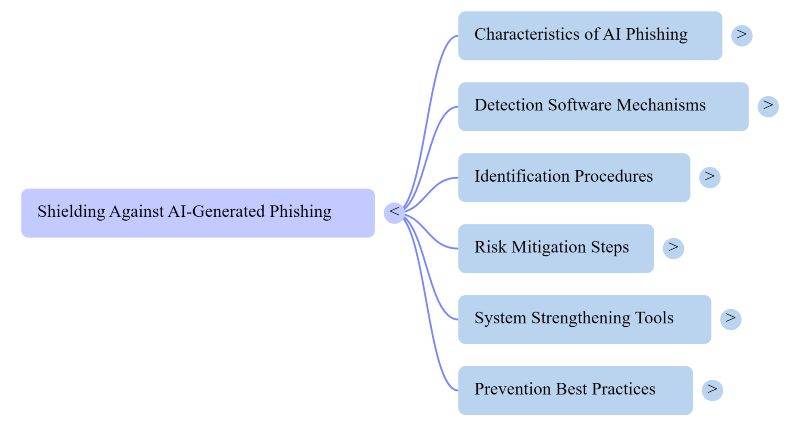
AI-generated phishing emails no longer contain obvious grammar mistakes. Attackers use language models to write convincing, personalized messages. These emails often reference real names, job titles, or recent events. Some even mimic a colleague’s writing style using leaked data. This level of detail makes manual detection nearly impossible. Software-based detection becomes essential for catching subtle inconsistencies.
How AI Phishing Detection Software Works
Detection software scans incoming emails for behavioral anomalies. It compares sender patterns against known safe contacts. Natural language processing checks tone, urgency, and phrasing irregularities. Link analysis tools scan URLs for hidden redirects or spoofed domains. Some platforms use sandboxing to test attachments before delivery. Machine learning models improve accuracy by learning from new attack samples daily.
Popular Categories of Detection Tools
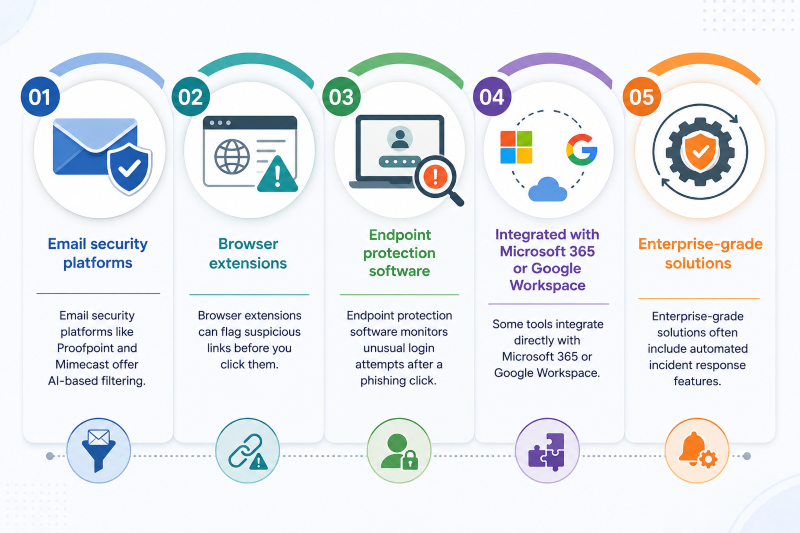
- Email security platforms like Proofpoint and Mimecast offer AI-based filtering.
- Browser extensions can flag suspicious links before you click them.
- Endpoint protection software monitors unusual login attempts after a phishing click.
- Some tools integrate directly with Microsoft 365 or Google Workspace.
- Enterprise-grade solutions often include automated incident response features.
Steps to Identify Phishing Attempts Using Software
- Start by enabling built-in email security filters first.
- Add a dedicated AI phishing detection software layer for deeper scanning.
- Review flagged emails instead of dismissing them automatically.
- Check sender domains carefully, even when the name looks familiar.
- Hover over links to verify the actual destination URL.
The report confirmed phishing attempts to strengthen your organization’s filter accuracy.
How to Mitigate Risks After Detection
- Isolate any device that clicked on a suspicious link immediately.
- Change passwords for accounts linked to the compromised email.
- Enable multi-factor authentication across all critical accounts.
- Run a full system scan to check for hidden malware.
- Notify your IT team so they can monitor for further attempts.
- Update phishing awareness training based on the specific attack pattern.
Strengthening Your System Against Follow-up Threats
Phishing emails often carry malware disguised as attachments or links. Fortect’s real-time protection helps catch these threats before they take hold, detecting malicious files that AI phishing detection software might miss after a click. It removes active threats and restores any system files damaged during an attack.
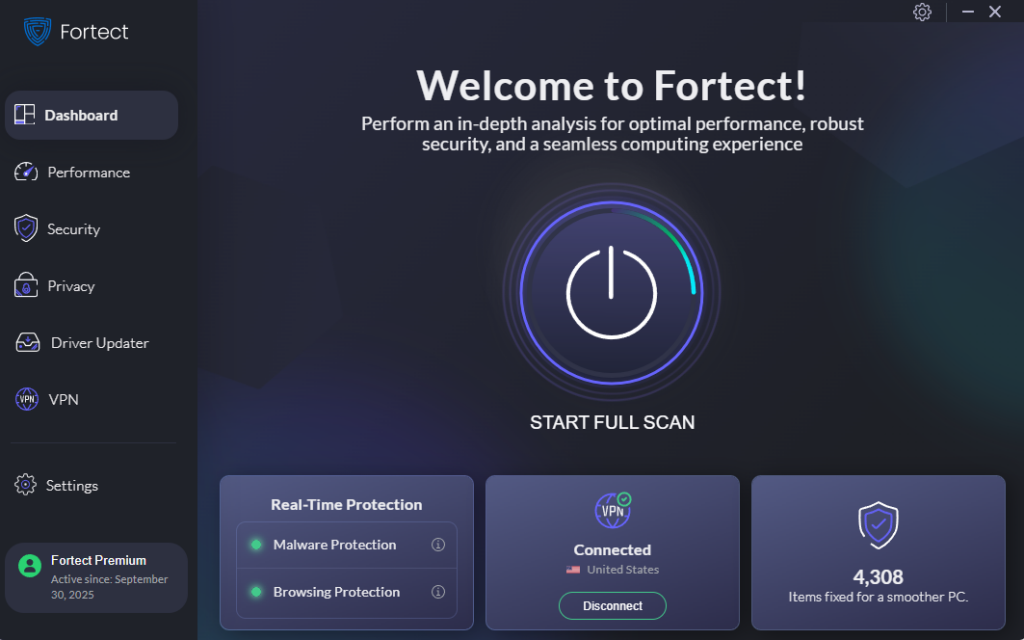
Beyond security, Fortect also handles routine performance cleanup, clearing junk files and resolving crashed programs for a smoother-running PC. Its built-in Driver Updater replaces outdated or corrupted drivers with verified versions, closing gaps that attackers often exploit after a successful phishing attempt. For anyone who wants an extra layer of protection alongside their existing email filters, giving Fortect a try is a practical next step.
Auditing Your Computer With Fortect
Checking your system for leftover threats takes just a few steps. Launch Fortect and click Scan to begin. It reviews all installed software and drivers automatically. Outdated or corrupted drivers get flagged and updated right away. The scan also detects threats, both modern and long-established, using real-time protection. Junk files and system clutter get cleaned up in the same pass.
Staying Secure on Public Networks
Phishing links sometimes lead to fake login pages on public Wi-Fi. Fortect Premium now includes a built-in VPN with Auto-Protect for open networks. It activates automatically once you connect to unsecured Wi-Fi. This encrypts your internet traffic and keeps your data private from intruders. Unsecured connections are a common entry point for zero-day attacks. A protected connection removes that risk before it becomes a problem.
Best Practices to Prevent Future Attacks
Keep software and detection tools updated at all times. Train employees to recognize subtle phishing indicators regularly. Limit the amount of personal information shared publicly online. Use email authentication protocols like DKIM, SPF, and DMARC. Back up important files in case of a successful attack. Review security software settings every few months for accuracy.