
How to Stay Safe from AI Threats Using a VPN
Artificial Intelligence (AI) has reshaped the internet, but it has also introduced a new generation of cyber risks. AI-powered attacks can manipulate, monitor, and exploit users with unprecedented precision. From deepfake scams to automated phishing and malware distribution, these threats are evolving faster than ever. Fortunately, using a Virtual Private Network (VPN) and the right security tools can help protect your online identity and data.
Understanding AI Threats

AI threats are cyberattacks that use artificial intelligence or machine learning to automate and enhance malicious activity. Unlike traditional malware, AI threats can adapt and learn from your behavior, making them harder to detect and stop.
Common examples of AI threats include:
- AI-generated phishing attacks that mimic trusted senders.
- Deepfake impersonation is used for scams and identity theft.
- Automated system exploitation through predictive hacking.
- Data scraping and profiling by AI algorithms to steal credentials.
How a VPN Protects You from AI Threats
A VPN (Virtual Private Network) encrypts your online data and masks your IP address, making it nearly impossible for AI systems or hackers to monitor or profile your activity.
1. Encryption of Personal Data
VPNs use end-to-end encryption protocols that protect your information from interception. Even if AI malware tries to analyze your traffic, all it sees is unreadable data.
2. Masking Your IP Address
AI-based attacks often rely on IP tracking to target victims. With a VPN, your IP is hidden, preventing AI models from linking your activities to your real identity.
3. Safer Wi-Fi Connections
Public networks are common entry points for AI-driven exploits. A VPN secures your connection on public Wi-Fi, keeping you safe from network sniffing and intrusion.
4. Blocking AI Data Harvesting
By hiding your location and encrypting your data, VPNs minimize your digital footprint, making it difficult for AI tools to analyze or harvest your browsing patterns.
Strengthen Your Protection Against AI Threats with Fortect
Fortect is a powerful and advanced antivirus equipped with real-time malware protection. It automatically scans your Windows PC for potential AI threats, fixes vulnerabilities, and optimizes your computer for peak performance.

What makes Fortect Premium stand out is its built-in Driver Updater, which identifies outdated or corrupted drivers and updates them safely from trusted sources. Since corrupted drivers are common entry points for malware injection or AI-based attacks, keeping them updated prevents hackers from exploiting your system.

Even better, Fortect Premium includes an integrated VPN with Auto-Protect functionality for public Wi-Fi. This ensures your device remains shielded from both malware and AI-powered cyber threats, a complete all-in-one security and performance solution for Windows users.
Download and install Fortect today.
How to Use a VPN on Windows 10/11
Whether you’re using Fortect Premium’s built-in VPN or another provider, here’s how you can configure it:
Option 1: Use Windows Built-in VPN
- Press Windows + I to open Settings.
- Navigate to Network & Internet → VPN.
- Select Add a VPN connection and choose Windows (built-in).
- Enter your VPN provider’s details, including server name and login credentials.
- Click Save, then Connect to activate the VPN.
Additional Security Tips to Stay Safe from AI Threats
1. Keep Windows Updated

AI-based exploits often target outdated systems.
- Open Settings → Windows Update → Check for updates.
- Install all available updates to patch known vulnerabilities.
2. Restrict User Permissions
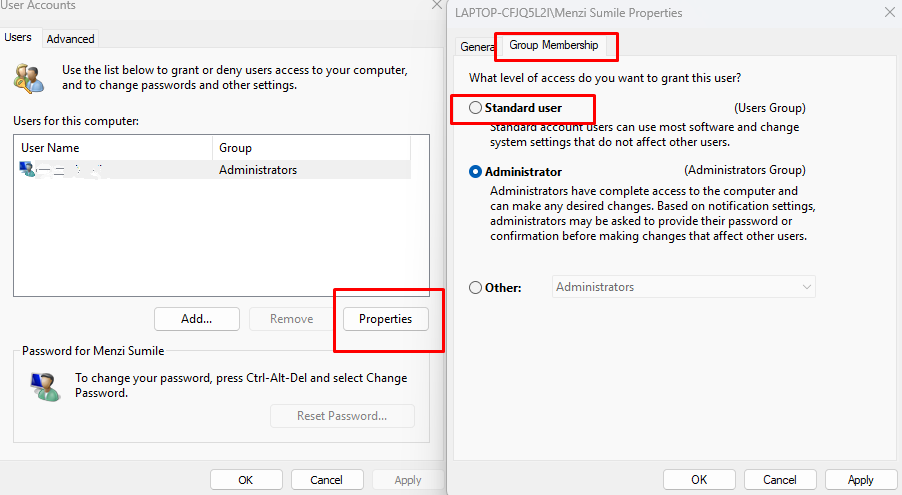
Prevent unauthorized system access by limiting user privileges:
- Go to Settings → Accounts → Family & other users.
- Change the account type to Standard user instead of Administrator.
3. Enable Windows Security
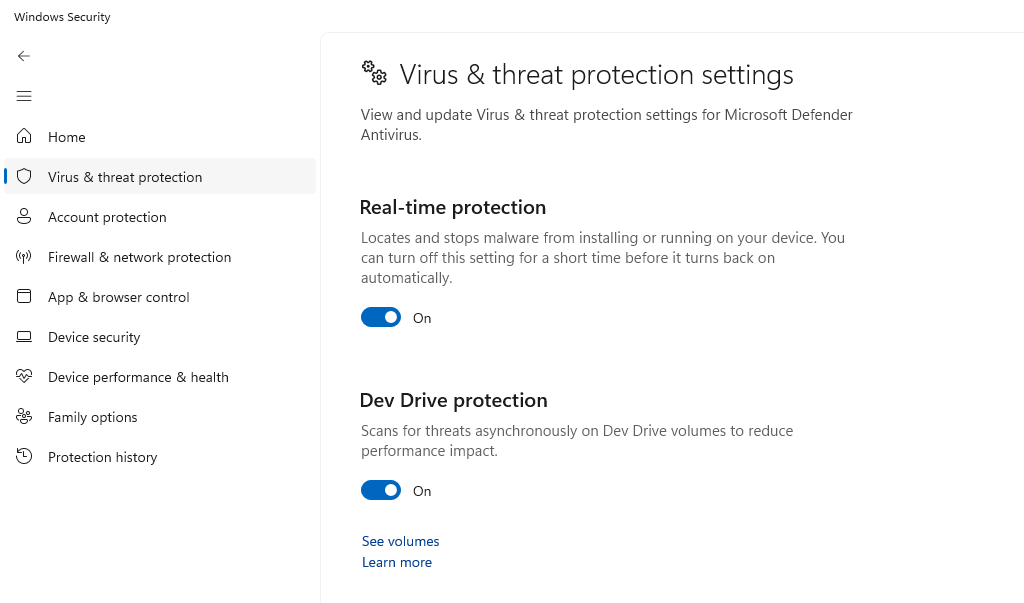
Activate built-in protections:
- Open Settings → Privacy & Security → Windows Security.
- Turn on Real-time protection under Virus & threat protection.
4. Use Strong Passwords
AI can predict weak passwords using pattern recognition. Combine uppercase, lowercase, numbers, and symbols, or use a password manager.
Conclusion
AI threats are becoming increasingly sophisticated, but you can stay ahead by securing your online presence. A VPN adds a vital layer of defense, and with Fortect, you get more than just a VPN; you get complete protection from malware, outdated drivers, and AI-driven exploits.
Safeguard your Windows PC today with Fortect’s all-in-one solution and browse the web with confidence knowing your data is fully protected.


